Case study 05 · Retail operations · Custom-manufacturing retailer
One order pipeline — from the showroom floor to the factory floor.
A made-to-order product was being sold through three disconnected systems: an in-store POS, an online store, and phone orders. Each spawned its own paperwork, and the factory rebuilt every spec by hand. I designed a single order pipeline so a custom order is captured once, routed to production automatically, and visible to the customer and the store — no matter where it started.
Overview
The problem
The retailer sold a custom-manufactured product — every blind cut to a specific window. But the order could start in three places that didn't talk to each other: a showroom POS, the e-commerce site, and a phone line. Each channel produced its own order format.
At the factory, that meant a person re-keying specifications from emails, printouts, and screenshots into the production system. Re-keying is where custom orders go to die: a transposed width, a missed mount type, and an entire made-to-order unit is scrapped.
The brief I wrote back: this isn't a POS skin. It's a service-design problem — connect three order sources to one factory queue, with status flowing back to the customer and the store.
Discovery
I followed one order from sale to shipment — and found four handoffs.
Before designing a screen, I shadowed the order itself: sat with showroom staff, placed test orders online, and walked the factory floor to see exactly where a custom spec changed hands and where it broke.
What the research said
The break was between systems, not inside them
Each individual tool worked. The failures lived in the gaps — the moments an order left one system and a human had to carry it to the next. Three gaps caused nearly all the rework.
Spec retyped at the factory
Online and phone orders arrived as text the factory retyped into production — the single largest source of wrong-cut scrap.
Source · factory shadowing + scrap logsNo status to give the customer
Once an order left the till, neither the shopper nor the associate could answer “where is it?” without phoning the plant.
Source · 11 staff & factory interviewsThree formats, one product
The same custom blind was described three different ways depending on where it sold, so nothing could be automated end to end.
Source · order-format auditThat evidence reframed the work from “a nicer POS” to “one canonical order object that every channel writes and the factory reads” — the change that removes re-keying entirely.
Before & after
The same custom order — re-keyed by hand, then captured once.
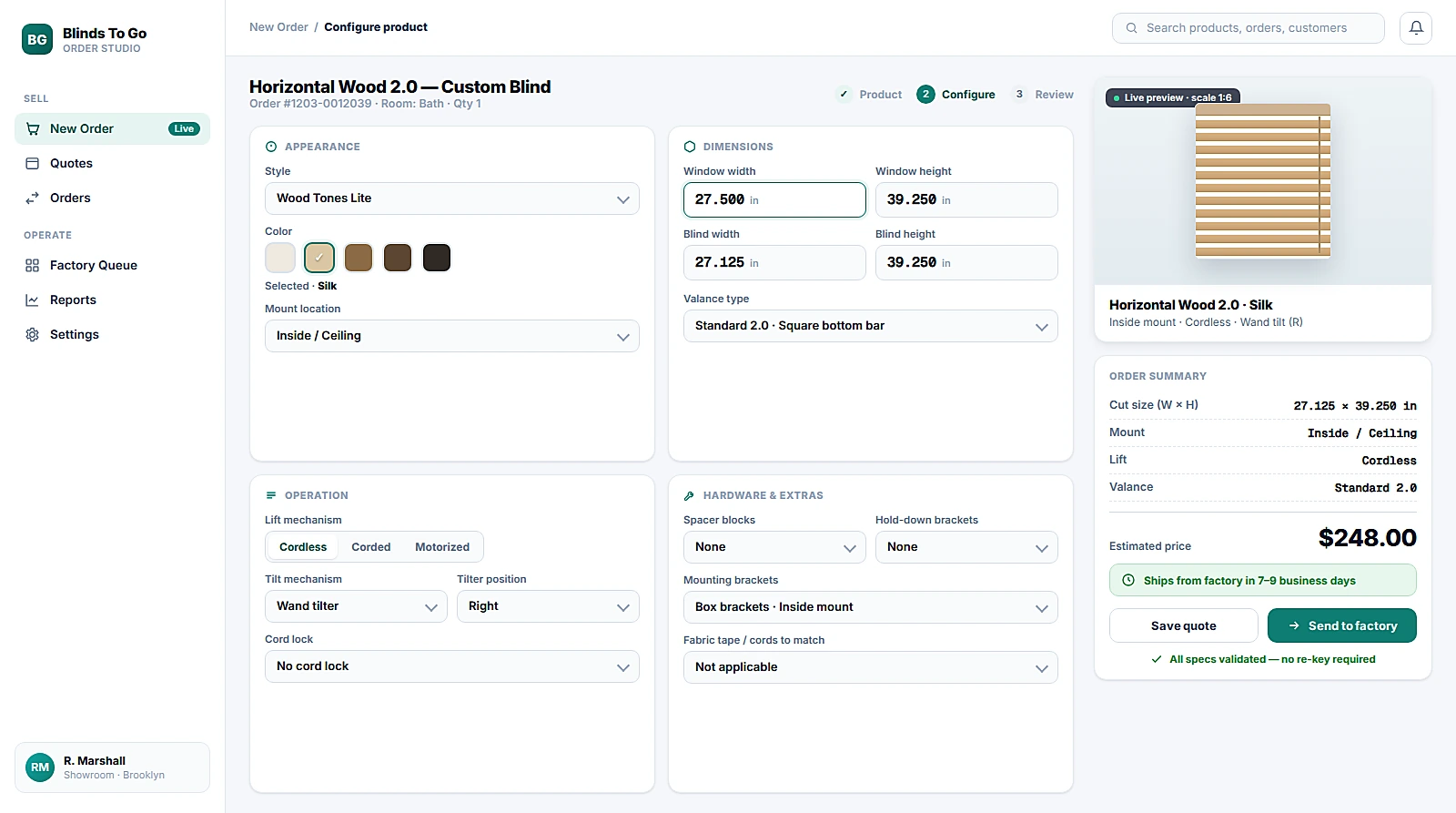
The showroom configured every blind in a legacy desktop screen, then someone re-typed those specs into production. I rebuilt that exact moment as a guided, validated order builder — same product, same fields, no re-key.
The core problem
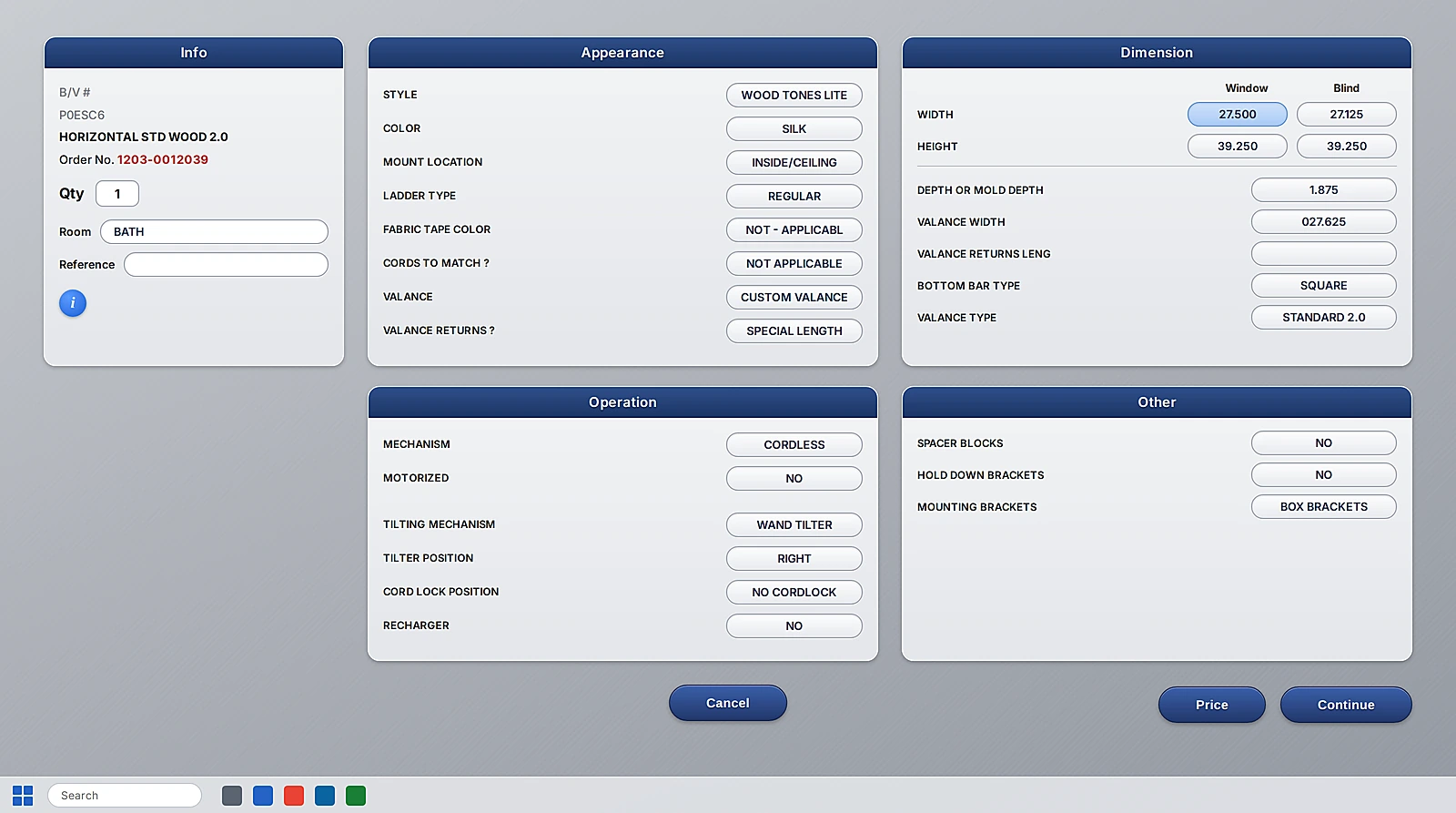
The product lived inside the dropdowns.
This is the actual screen on the showroom floor. Every detail that defined a blind — style, color, mount, mechanism, valance, bracket type — was buried in dozens of separate dropdowns spread across five panels, with nothing shown until the associate opened each one.
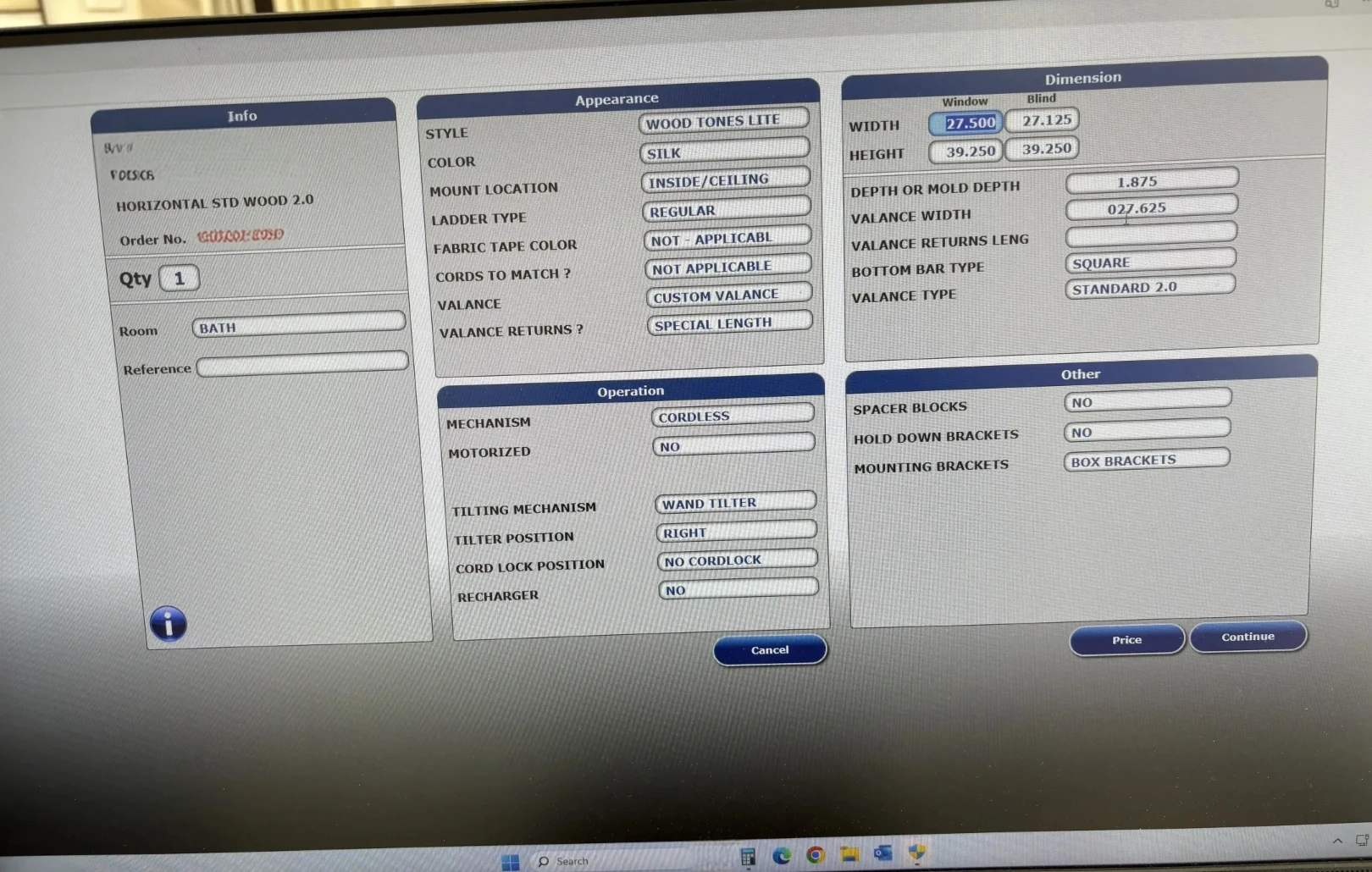
Because the configuration was hidden across so many dropdowns, the screen was a direct time cost. Associates clicked through panel after panel to find the right option, hesitated on fields they rarely touched, and slowed down in front of the customer — and new hires needed weeks of training just to know where each setting lived and which combinations were valid. The redesign’s job was to pull that hidden product information out into the open, so the right choice is visible at a glance instead of memorized.
The system
Capture once. Route automatically. Track everywhere.
The spine of the redesign is a single canonical order — every channel writes to it, the factory reads from it, and status flows back without anyone re-typing a thing.
Flows
Three moves, end to end
Each flow closes one of the three gaps the research exposed — capture, production, and status — shown on the real screens that shipped.
Configure the order once, at the point of sale
The showroom POS becomes a guided custom-order builder: width, height, material, mount, and control are structured fields — not free text — so the order is valid before it's ever sent. A live price and lead time remove the “let me check” phone call, and one button sends it straight to the factory queue.
The factory works a queue, not an inbox
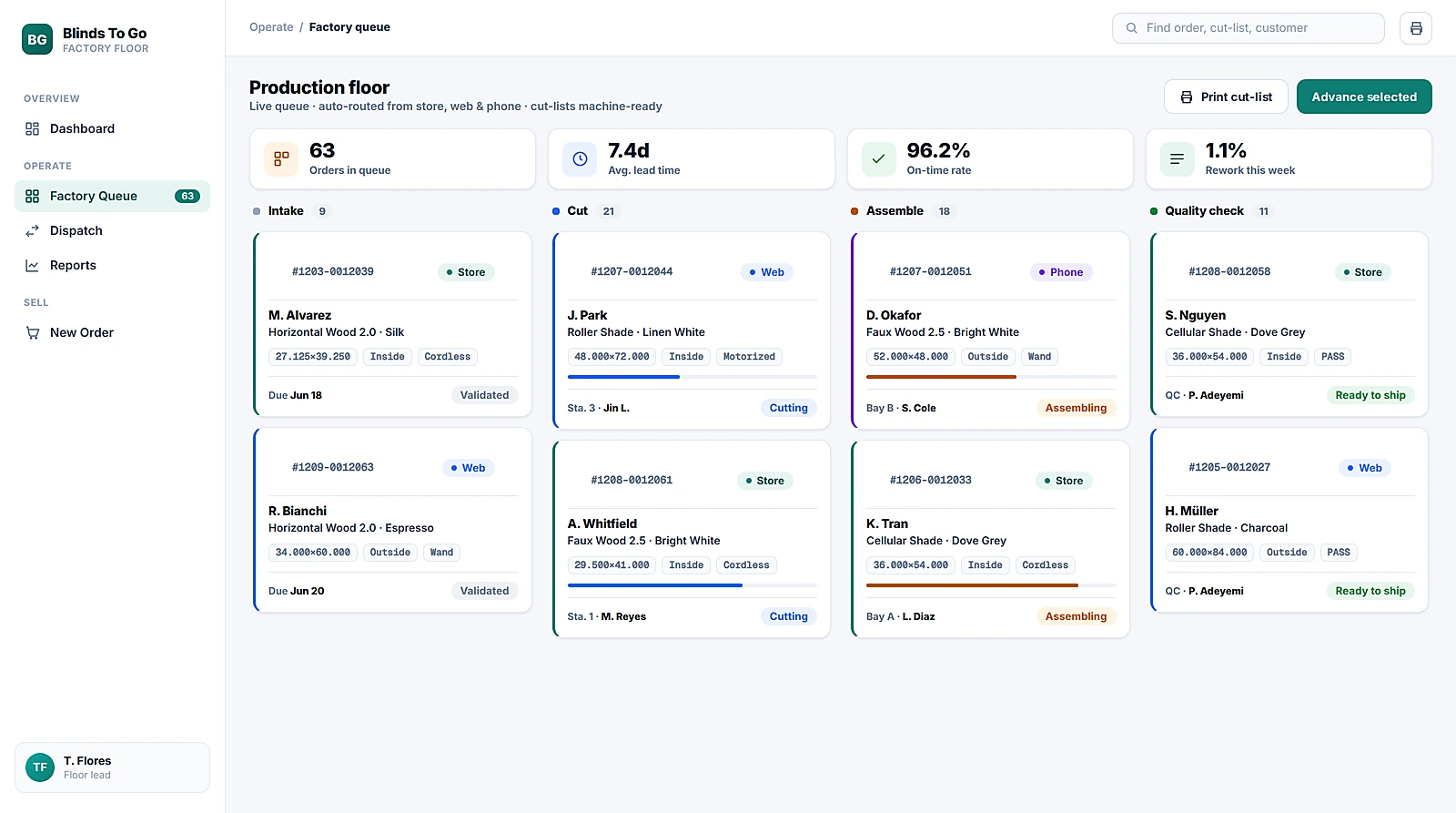
Production gets a floor dashboard instead of a pile of printouts. Orders move through Cut → Assemble → Quality Check as cards, each carrying its own cut-list spec and a channel tag so the floor knows an in-store rush from an online standard. The numbers the business cares about — queue depth, lead time, on-time rate, rework — sit at the top.
One status, for the customer and the store
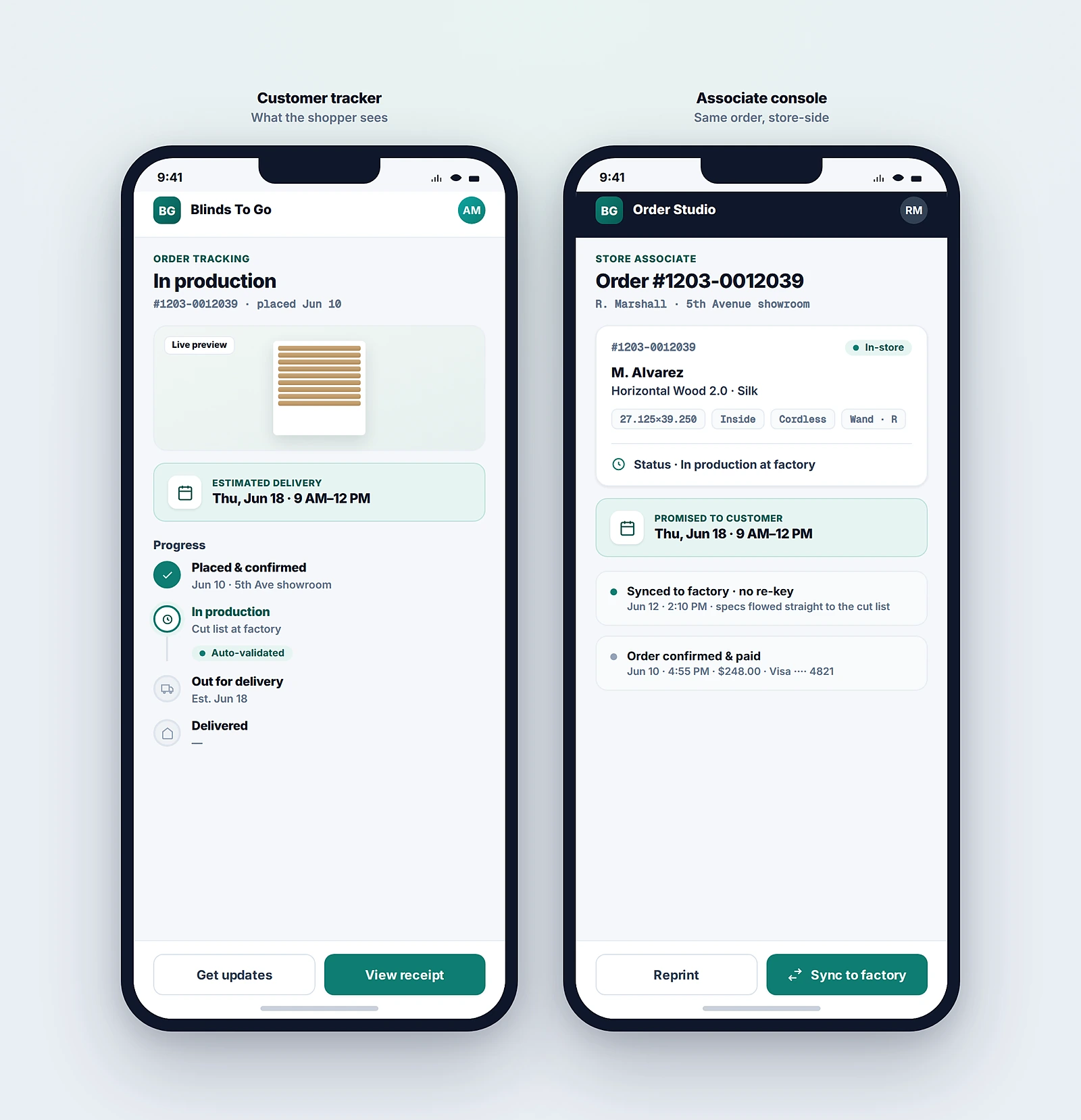
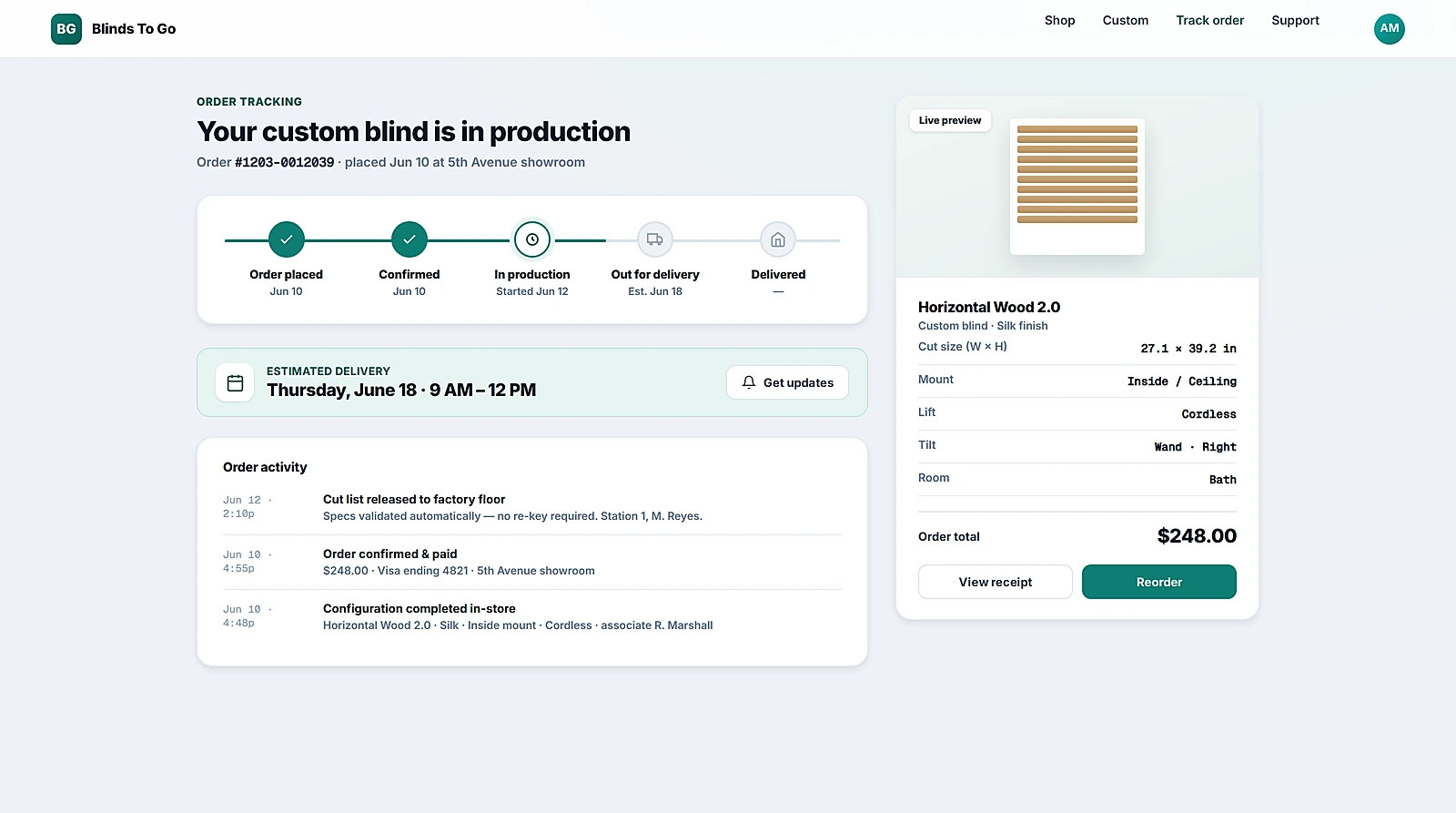
Because every order is the same object, status can flow back to two audiences from one source: the customer sees a plain-language tracker, and the associate sees the same order with a Sync to Factory action. “Where is my order?” stops being a phone call.
One live queue for every channel
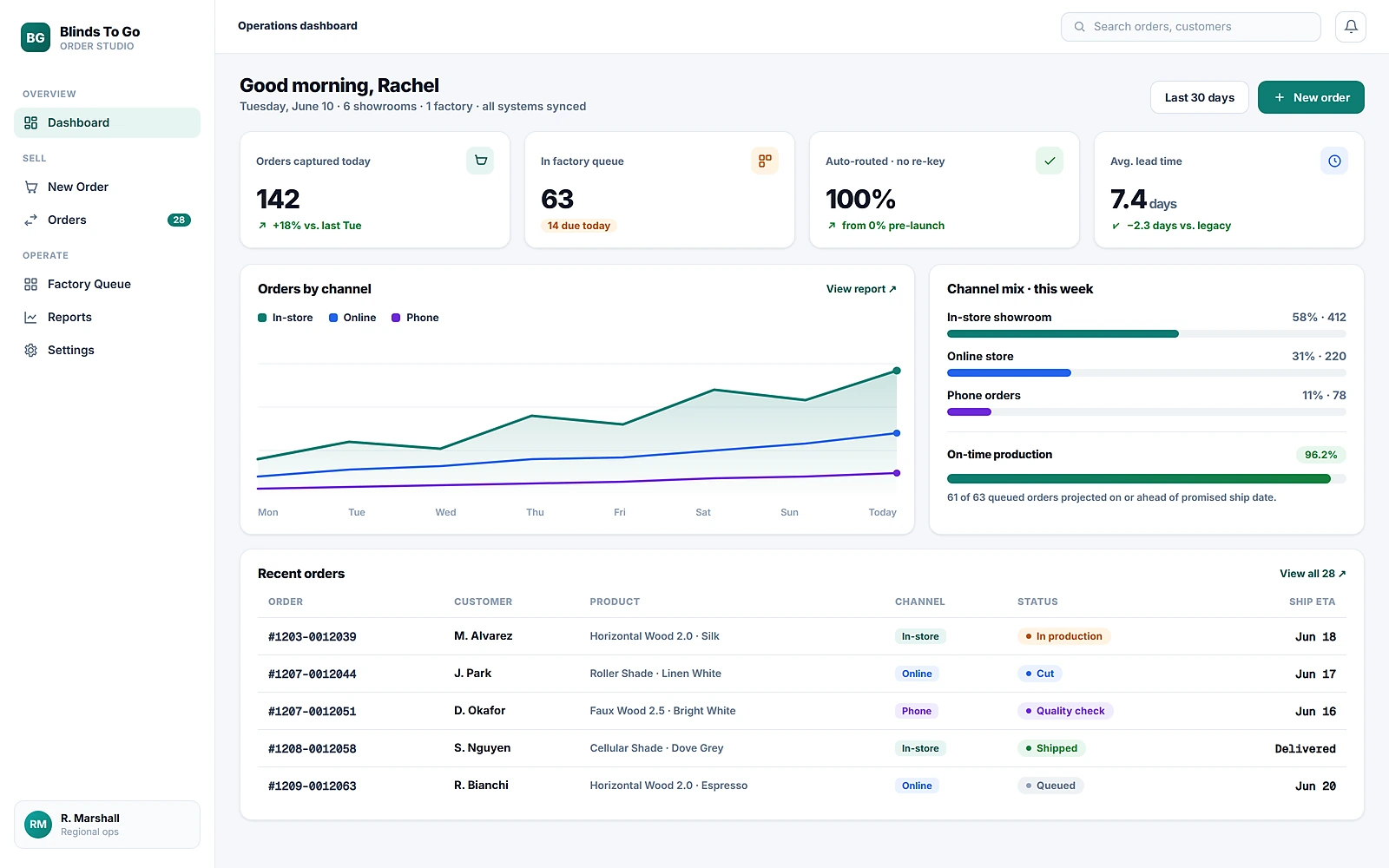
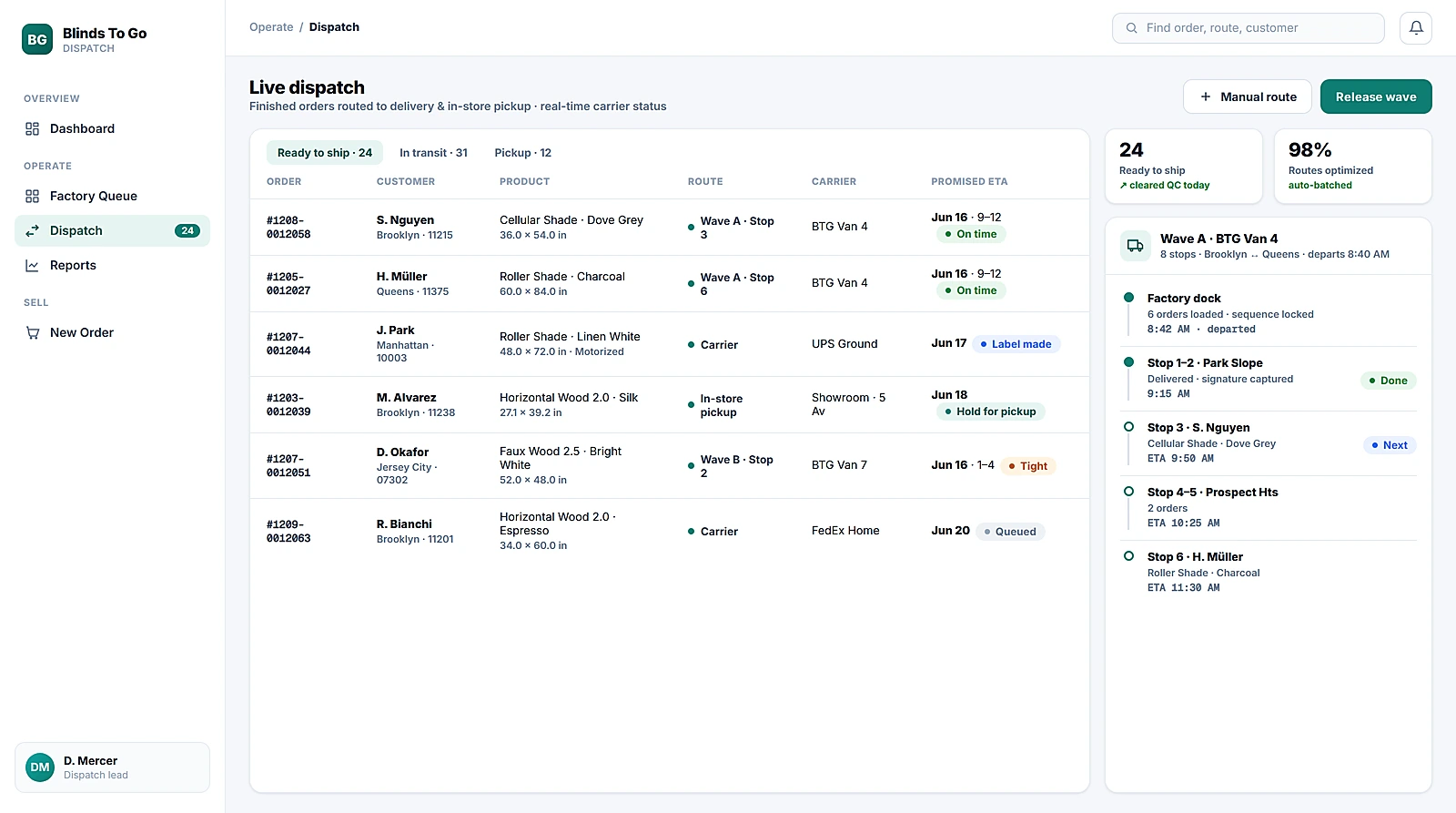
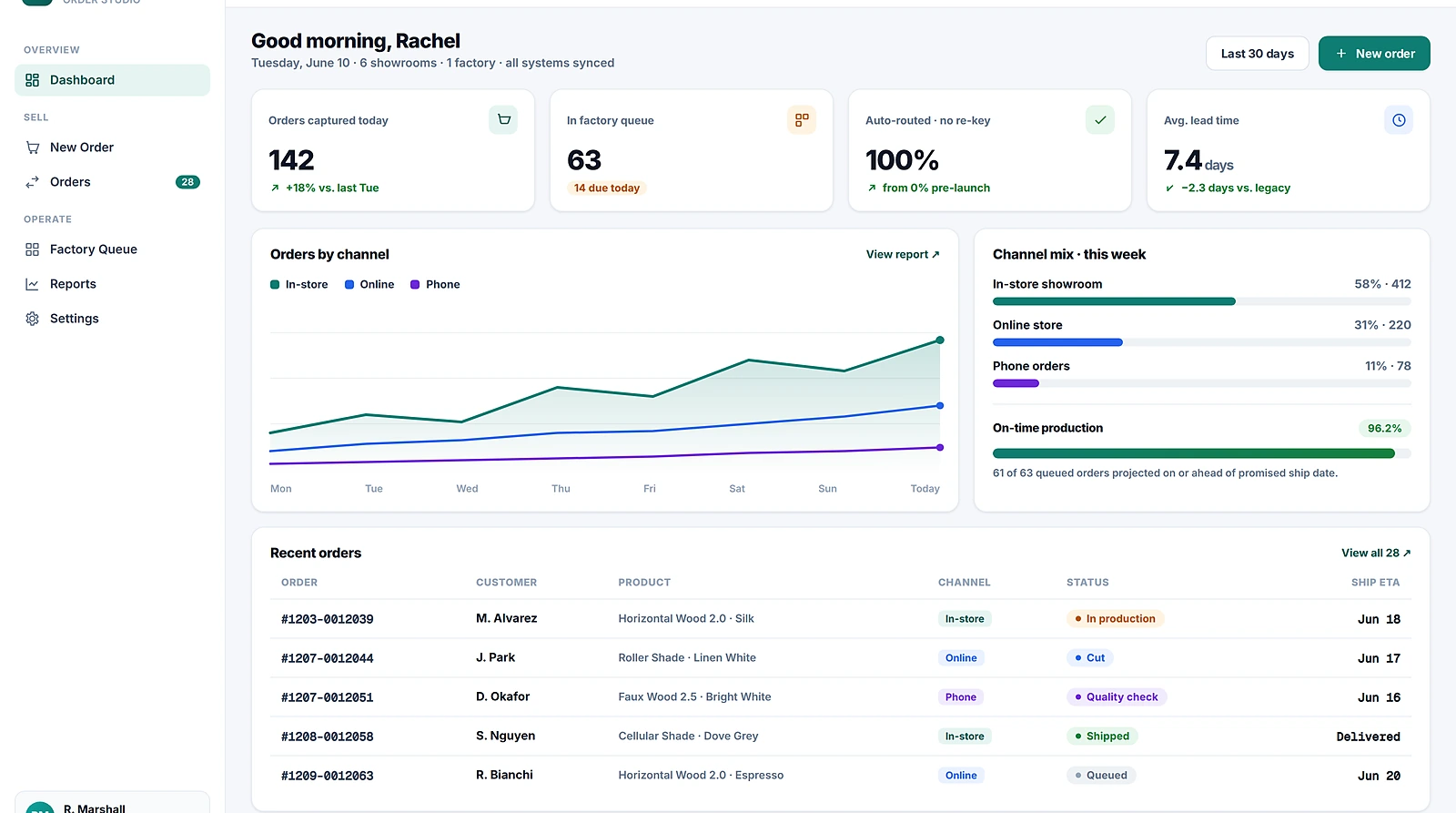
Operations needed a single place to watch the seam they used to lose orders in. The live pipeline board shows every order from every channel as it lands — captured-today, in-queue, and auto-routed counts up top, then a real-time table with channel, product, customer, color-coded production status, and factory ETA. No inbox to triage, no spreadsheet to reconcile.
The status the customer actually sees
The same order object powers the page the shopper lands on. A branded tracker shows a production timeline — placed, spec sent to factory (auto-routed, no re-key), cut, assembling, quality check, shipped — alongside the exact made-to-order specification and a delivery estimate. The blind spot that used to require a phone call to the plant becomes a self-serve answer.
Results
Fewer handoffs, less scrap, a custom order you can track.
This was a design-and-service engagement, so the outcomes are framed structurally rather than as launch lift. The 4 → 0 handoffs and 3 → 1 formats are facts of the redesigned order model — counted directly from the current-state service map versus the proposed flow. Validated reflects moderated walkthroughs where showroom associates placed a custom order and factory operators worked it from the queue without falling back to a printout or a phone call.
The factory team had built years of trust in their printed travelers and didn't want a screen between them and the machine. My first concept replaced the paper outright and was rightly rejected in testing. The version that worked kept the cut-list printable from the dashboard during a transition period — a digital source of truth that still produced the artifact the floor trusted. Designing for the rollout, not just the end state, is what got operations to adopt it instead of route around it.
Business impact · ROI
What killing the re-key is worth on the floor.
This was a design-and-service engagement, so I sized the impact from the order model itself — the scrap, the lost orders, and the labor that disappear when four manual handoffs collapse to zero and one canonical record replaces three formats.
These are projections, not post-launch measurements — stated as ranges on purpose. Scrap savings apply the plant's reported custom-order defect rate and per-unit material cost to the share of defects traced to re-keyed specs, then assume the modeled −70% reduction from validating the spec at the point of sale. The labor figure multiplies the per-order handoff time (counted from the current-state service map) by annual custom-order volume at a fully-loaded floor rate. Lead-time and payback are derived from the same operational inputs. The handoff and format counts (4 → 0, 3 → 1) are facts of the redesigned order model, not estimates.
Reflection
What designing across the seam taught me
Design the order, not the screen
Defining one canonical order object did more than any interface could — it made automation possible and re-keying impossible.
The expensive bugs live in the gaps
Every system worked alone. The scrap, the lost orders, and the phone calls all happened in the handoffs between them.
Capture structure where the order is born
Validating a custom spec at the point of sale is cheaper than catching it at the saw — push correctness upstream.
Earn adoption with the rollout, not the demo
Respecting the factory's trusted paper traveler during transition is what turned a good design into one operations actually used.